6 Best QuickBooks Alternatives for Freelancers (2026), Including Free Options
In short: The best QuickBooks alternatives for freelancers in 2026: FreshBooks, Wave, Zoho Books, Xero, Found and Bonsai compared on price and features, plus how to switch safely.


On this page
- Why freelancers look for QuickBooks alternatives
- QuickBooks alternatives for freelancers: comparison
- 1. FreshBooks: best QuickBooks alternative for service freelancers
- 2. Wave: best free QuickBooks alternative
- 3. Zoho Books: best free full-accounting alternative
- 4. Xero: best alternative if you work with an accountant
- 5. Found: best all-in-one for banking and taxes
- 6. Bonsai: best for client workflow
- How to switch from QuickBooks without losing data
- When you should stay with QuickBooks
- Yearly cost: QuickBooks vs the alternatives
- Which alternative fits your work?
- Features to compare before you switch
- Moving your data: what transfers and what doesn’t
- Run both systems for one month
- Taxes: what your new software needs to produce
- Hidden costs to watch for
- Is a spreadsheet enough instead?
- QuickBooks Solopreneur: a cheaper option inside QuickBooks
- Free vs paid: what you give up at $0
- What your accountant wants to see
- Mistakes to avoid when switching
- Our bottom line
- Frequently asked questions
- Sources
QuickBooks is the default accounting software in the US, but it isn’t always the best fit for freelancers. Prices have climbed year after year, Simple Start now costs $38 per month at full price, and many features are built for businesses with employees and inventory, not one-person service businesses. If you’re paying for more than you use, there are good QuickBooks alternatives for freelancers, including several free ones.
Quick pick: switch to FreshBooks if you bill clients for time or projects, Wave or Zoho Books if you want to pay $0, Xero if you work with an accountant, and Found if you’d rather have banking, bookkeeping and tax estimates in one free app.
How we chose: we compared plans, limits and prices from official provider pages and recent pricing coverage (checked October 2026). No provider paid to be included. Confirm prices before switching.
Why freelancers look for QuickBooks alternatives
- Rising prices. NerdWallet reports average QuickBooks price increases of roughly 11.9% to 17.3% across plans since 2023.
- Complexity. QuickBooks Online is full double-entry accounting, which is more than most solo freelancers need.
- Invoicing focus. Freelancers often care more about invoices, time tracking and getting paid than about inventory or payroll.
- Free alternatives exist that cover the essentials for a one-person business.
QuickBooks alternatives for freelancers: comparison
| Alternative | Best for | Regular price | Free option | Biggest advantage over QuickBooks |
|---|---|---|---|---|
| FreshBooks | Service freelancers | $23/mo Lite; $43/mo Plus | Trial | Built around invoicing, time tracking and clients |
| Wave | Free bookkeeping + invoicing | $0 Starter; $19/mo Pro | Yes | Free unlimited invoices and bookkeeping |
| Zoho Books | Free real accounting under $50K | $0 if revenue ≤ $50K; $15/mo Standard (annual) | Yes | Full double-entry accounting for free |
| Xero | Working with an accountant | $25/mo Early; $55/mo Growing | Promos | Strong reconciliation, unlimited users |
| Found | Banking + bookkeeping + taxes in one | $0; Plus $35/mo | Yes | Automatic tax estimates and expense categorization |
| Bonsai | Proposals, contracts and invoices | $19/mo Essentials (annual) | 7-day trial | Client workflow from proposal to payment |
For reference, QuickBooks Online lists Simple Start at $38/month and Essentials at $85/month (regular prices), and QuickBooks Solopreneur Lite costs $20/month.
1. FreshBooks: best QuickBooks alternative for service freelancers
FreshBooks puts clients and invoices at the center. Every plan includes unlimited time tracking, expenses, mileage tracking and automatic bank imports. Lite ($23/month) supports 5 billable clients, and Plus ($43/month) supports 50 and adds proposals, retainers, accountant access and double-entry reports. Freelancers who mostly invoice for their time often find it faster and friendlier than QuickBooks.
2. Wave: best free QuickBooks alternative
Wave’s Starter plan is free, with unlimited invoices, estimates, bills and bookkeeping records. If you want automatic bank imports and branded invoices, Pro costs $19/month, still half the price of QuickBooks Simple Start. Card payments on the free plan cost 2.9% + $0.60.
3. Zoho Books: best free full-accounting alternative
Zoho Books is the closest free equivalent to QuickBooks Online. The free plan is available while your annual revenue stays at or below $50,000, and it includes 1,000 invoices per year plus accountant access. Once you outgrow it, Standard is $15/month billed annually.
4. Xero: best alternative if you work with an accountant
Xero is many accountants’ second favorite after QuickBooks, and some prefer it. Its bank reconciliation is excellent, and all plans include 1099 management and online invoice payments. The Early plan ($25/month) caps you at 20 invoices per month, so active freelancers usually need Growing ($55/month).
5. Found: best all-in-one for banking and taxes
Found combines a free business checking account with automatic expense categorization, tax estimates, unlimited invoicing and contractor payments with 1099 filing. Found Plus ($35/month or $315/year) adds interest on balances, imports from other banks and unlimited categorization rules. It isn’t traditional accounting software, but for many solo freelancers it replaces QuickBooks entirely.
6. Bonsai: best for client workflow
If your main pain is the client process (proposals, contracts, invoices and follow-ups) rather than bookkeeping, Bonsai Essentials ($19/month billed annually) covers it in one tool and integrates with QuickBooks and Xero on higher plans.
How to switch from QuickBooks without losing data
- Pick a clean switch date, ideally the start of a month, quarter or tax year.
- Export your data from QuickBooks: customer list, open invoices, chart of accounts and reports (profit & loss, balance sheet) as PDFs and spreadsheets.
- Use the new tool’s import or migration feature. Many offer free migration help.
- Reconnect your bank accounts and confirm the opening balances match.
- Recreate recurring invoices and payment settings, then tell clients about any new payment links.
- Keep read-only access or archived exports of QuickBooks for at least your tax-record retention period.
The IRS generally recommends keeping records that support items on your tax return for at least three years, and longer in some situations. See IRS: How long should I keep records?.
When you should stay with QuickBooks
- Your accountant or CPA works exclusively in QuickBooks and charges more for other tools.
- You run payroll, inventory or multiple entities.
- You use integrations that only connect to QuickBooks.
If none of those apply, a lighter tool will probably save you time and money. For a broader comparison including QuickBooks Solopreneur, read our guide to the best accounting software for freelancers. If billing is your main need, see the best invoicing software for consultants.
Yearly cost: QuickBooks vs the alternatives
| Software | Plan | Approximate yearly cost |
|---|---|---|
| QuickBooks Online | Simple Start | $456 ($38/month) |
| QuickBooks Solopreneur | Lite | $240 ($20/month) |
| FreshBooks | Lite | $276 ($23/month) |
| Wave | Starter / Pro | $0 / $228 |
| Zoho Books | Free / Standard | $0 / $180 (annual billing) |
| Xero | Early / Growing | $300 / $660 |
| Found | Free / Plus | $0 / $420 |
| Bonsai | Essentials | $228 (annual billing) |
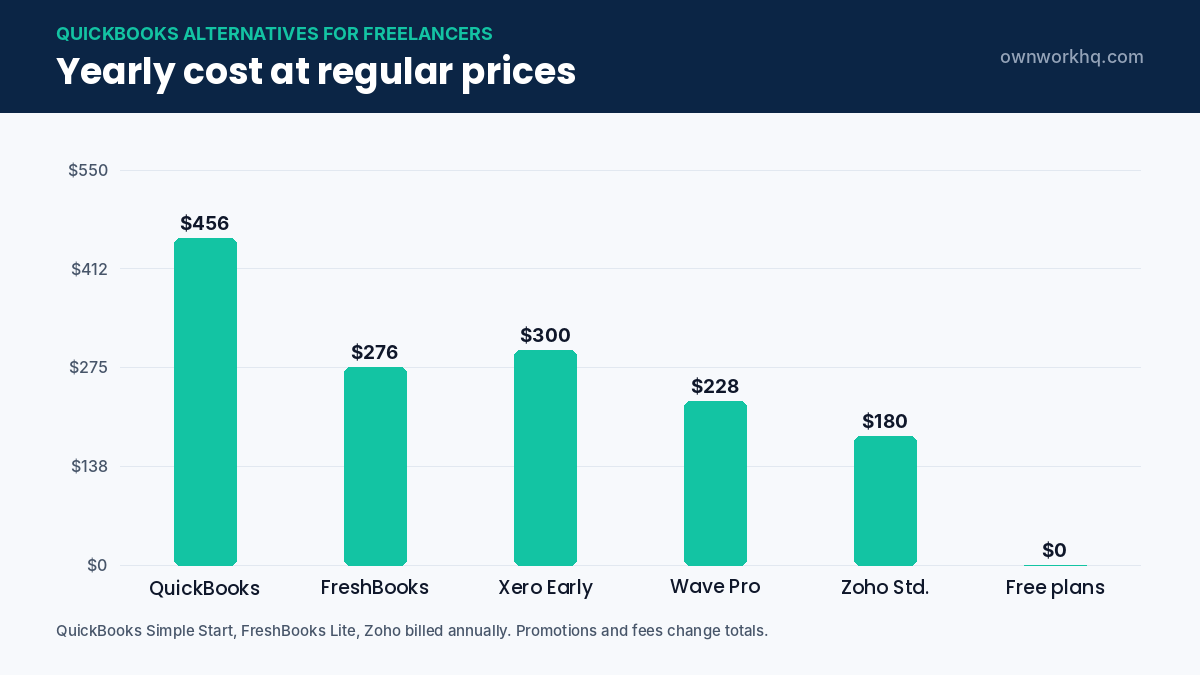
Based on the regular prices listed earlier in this guide. Introductory discounts, add-ons and payment processing fees change the real total, so compare the plan you would actually use. For most solo freelancers, the cheapest QuickBooks alternatives for freelancers save $200 to $450 a year.
Which alternative fits your work?
| What matters most to you | Best fit |
|---|---|
| Invoicing clients and tracking time | FreshBooks |
| Paying nothing for basic bookkeeping | Wave or Zoho Books |
| Working closely with an accountant | Xero |
| Banking, bookkeeping and tax estimates in one app | Found |
| Proposals, contracts and invoices together | Bonsai |
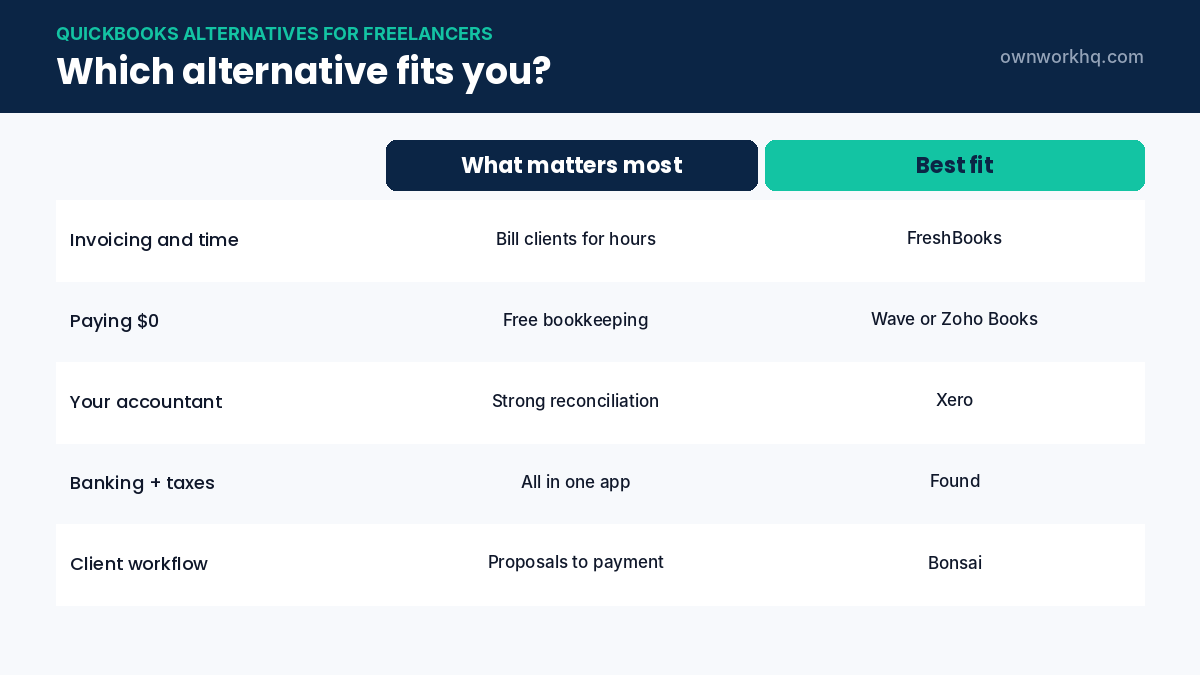
If two needs matter equally, choose the tool your accountant already knows. That saves time and fees at tax season.
Features to compare before you switch
- Bank feeds: automatic imports from your business bank account and cards.
- Invoicing and payments: online card and ACH payments, reminders and recurring invoices.
- Expense categories: categories that map to Schedule C lines for easier tax filing.
- Receipt capture: a mobile app that photographs and attaches receipts.
- Mileage tracking: built in or through an integration.
- Reports: profit and loss, and income by client at minimum.
- Accountant access: a free seat for your tax preparer.
- Data export: a full export so you can leave later without losing records.
Moving your data: what transfers and what doesn’t
Most accounting software can import customers, vendors and a chart of accounts from a spreadsheet. Some tools also offer QuickBooks import wizards. Detailed transaction history is harder to move, so many freelancers start the new tool on the first day of a new year or quarter and keep QuickBooks reports for the earlier period.
- Export a profit and loss report, balance sheet and general ledger from QuickBooks.
- Export customer and vendor lists, and your list of products and services.
- Save copies of all invoices and receipts attached to transactions.
- Note open invoices and unpaid bills so you can recreate them in the new system.
- Download your 1099 contractor records if you paid contractors.
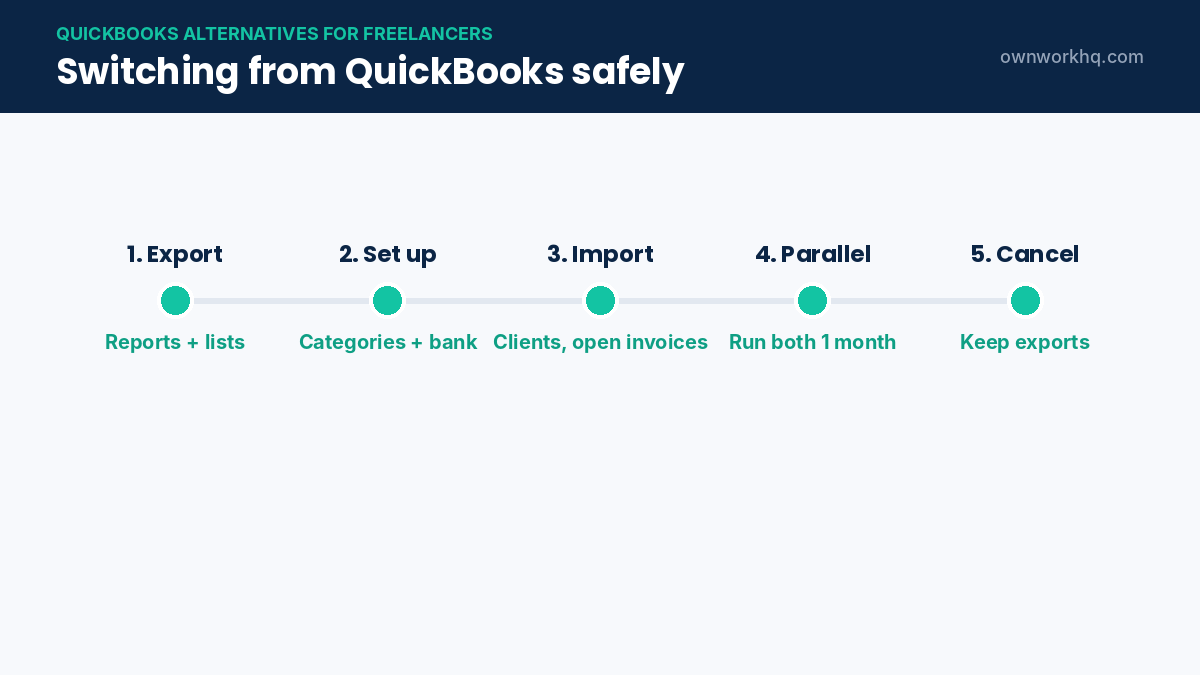
Store these files with your tax records. The IRS generally expects you to keep records that support your return for at least three years, and longer in some cases.
Run both systems for one month
For the first month, keep QuickBooks active (or downgraded) while you set up the new tool. Connect your bank, categorize a month of transactions, send a few invoices and run a profit and loss report. If the numbers match what you expect, cancel QuickBooks. If something is missing, you still have access to fix it.
Taxes: what your new software needs to produce
- Profit and loss by Schedule C category for your quarterly estimated taxes and annual return.
- Mileage log with dates, purpose and miles if you deduct vehicle costs.
- Contractor payments for any 1099-NEC forms you must issue.
- Home office details if you claim the deduction.
Any of the tools in this guide can produce these, but some need correct setup from day one. Our guide on how to track freelance expenses explains the categories to use.
Hidden costs to watch for
- Payment processing fees, often around 2.9% plus a fixed fee per card payment.
- Payroll add-ons, which you only need if you have employees or an S corp salary.
- Extra users for assistants or partners on some plans.
- Client or invoice limits on entry plans that push you to upgrade.
- Promotional prices that rise after the first months.
Read the pricing page carefully and set a reminder before any introductory price ends.
Is a spreadsheet enough instead?
Some freelancers with a handful of clients and few expenses use a spreadsheet and a separate invoicing tool. That can work in your first year, but it gets harder once you have many transactions, need to reconcile bank statements or want reports for an accountant. A free tool like Wave or Zoho Books usually gives you more with less effort, so it’s often the better QuickBooks alternative even at low volume.
QuickBooks Solopreneur: a cheaper option inside QuickBooks
Before you leave QuickBooks entirely, check QuickBooks Solopreneur. It’s designed for one-person businesses, separates business and personal transactions, tracks mileage and estimates quarterly taxes, at a lower price than QuickBooks Online. It isn’t full double-entry accounting, so it works best for simple service businesses. If your accountant prefers QuickBooks, Solopreneur can be a middle ground; if not, a dedicated QuickBooks alternative may still be cheaper and simpler.
Free vs paid: what you give up at $0
| Feature | Typical free plan | Typical paid plan |
|---|---|---|
| Invoices and estimates | Yes, often unlimited | Yes, with branding and automation |
| Automatic bank imports | Sometimes limited or manual | Yes |
| Receipt capture | Limited | Yes, with mobile app |
| Recurring invoices and reminders | Sometimes | Yes |
| Accountant access | Sometimes | Yes |
| Support | Email or help center | Chat or phone |
For many new freelancers, a free plan of a good accounting software is enough for the first year. Upgrade when manual work starts taking more than an hour a month; at that point the paid plan usually pays for itself in saved time.
What your accountant wants to see
- Reconciled bank accounts that match your statements for every month.
- Consistent categories that map to the lines on your tax return.
- Separate personal transactions, ideally in a separate account entirely.
- Owner draws and contributions recorded clearly, not as income or expenses.
- A clean year-end report of profit and loss and contractor payments.
Any of the QuickBooks alternatives for freelancers in this guide can produce this if you set them up carefully. Ask your accountant for read-only access instructions, and give them their own login rather than sharing yours.
Mistakes to avoid when switching
- Cancelling QuickBooks before exporting your reports and records.
- Switching in the middle of a busy month, when mistakes are more likely.
- Importing duplicate transactions from both the bank feed and a spreadsheet.
- Changing category names without telling your accountant.
- Forgetting to update payment links on recurring invoices.
Most of these mistakes are easy to avoid with a short checklist and a month of running both systems. Choose your QuickBooks alternative, set a switch date, and follow the steps in this guide.
Our bottom line
There’s no single best tool for everyone. If you mostly send invoices and track time, FreshBooks is the most natural fit. If cost matters most, start on the free plan of Wave or Zoho Books and upgrade only when you need to. If you have an accountant, ask which software they prefer before you decide, because their familiarity with the tool will save you time and fees every year. Whichever you choose, try it with real transactions for a few weeks before committing, and keep your QuickBooks exports safe with your tax records.
Frequently asked questions
What is the best free alternative to QuickBooks for freelancers?
Wave and Zoho Books are the strongest free alternatives. Wave offers free unlimited invoicing and bookkeeping, while Zoho Books offers free full accounting for businesses with up to $50,000 in annual revenue.
Is FreshBooks better than QuickBooks for freelancers?
For freelancers who bill clients for time or projects, FreshBooks is often easier and more focused. QuickBooks offers deeper accounting and is better if you have employees, inventory or a CPA who prefers it.
Can I move my QuickBooks data to another program?
Yes. Most alternatives can import customers, invoices and transactions, and some offer free migration assistance. Export reports and keep an archive of your QuickBooks data for tax purposes.
How much does QuickBooks cost for a freelancer in 2026?
QuickBooks Solopreneur Lite costs $20/month and QuickBooks Online Simple Start costs $38/month at regular prices, with promotional discounts often offered for the first months.
Will switching accounting software affect my taxes?
No, as long as your records stay complete and accurate. Switch at a clean date and make sure opening balances match your bank statements.
What is the cheapest QuickBooks alternative for freelancers?
Wave, Zoho Books (while revenue is at or below $50,000) and Found all offer free plans. They cover invoicing and basic bookkeeping for most solo freelancers.
Will my accountant accept files from a QuickBooks alternative?
Most accountants work with Xero, FreshBooks and other common tools, and all of them export standard reports. Ask your accountant which tool they prefer before you switch.
Can I switch accounting software in the middle of the year?
Yes, but it’s simpler at the start of a month or quarter. Keep your old reports for the earlier period so your annual totals are complete.
Is Wave really free?
Wave’s Starter plan is free for invoicing and bookkeeping. You pay for card and bank payments you accept online, and the Pro plan adds automatic bank imports and other features for a monthly fee.
Which QuickBooks alternative is best for freelancers who bill hourly?
FreshBooks and Bonsai both include time tracking and invoicing from tracked hours, which makes them a strong fit for freelancers who bill by the hour.
Sources
- NerdWallet: QuickBooks pricing (updated March 2026)
- QuickBooks pricing
- FreshBooks pricing
- Wave pricing
- Zoho Books pricing
- Xero pricing
- Found pricing
- IRS: How long should I keep records?
Disclaimer: This article is for informational purposes only and is not financial advice. Product features and prices change frequently, so confirm current details on each provider’s website before you sign up. OwnWork HQ may earn a commission from some links, at no extra cost to you.
About OwnWork HQ Editorial
We write plain-English guides for US freelancers and check every rate, limit and deadline against IRS and state agency publications. We are not CPAs or financial advisors; for advice on your situation, talk to a qualified professional.