How to Write an Invoice as a Freelancer (Step by Step + Email Template)
In short: How to write an invoice as a freelancer, step by step: what to include, how to itemize work, an email template to send it, and a follow-up schedule for late payments.

On this page
- How to write an invoice as a freelancer in 9 steps
- Step 1: Confirm what you agreed with the client
- Step 2: Collect the client’s billing details
- Step 3: Choose your invoice number and dates
- Step 4: Itemize your work
- Step 5: Add totals, taxes and discounts
- Step 6: Explain how to pay
- Step 7: Add terms and a thank-you
- Step 8: Send it as a PDF with a clear email
- Step 9: Track and follow up
- Common invoicing mistakes to avoid
- Anatomy of a professional invoice
- Example invoice for a freelance project
- Choosing payment terms
- Invoicing deposits, milestones and retainers
- Follow-up schedule for unpaid invoices
- Sales tax on freelance invoices
- Invoicing international clients
- Record keeping after you send it
- Should you use software or a template?
- Freelance invoice email template
- Invoice numbering that stays organized
- What to do when a client disputes an invoice
- Freelance invoice checklist before you hit send
- Getting paid faster: small changes that work
- Frequently asked questions
Writing your first invoice as a freelancer can feel oddly stressful. What do you call it? What number do you start with? How do you ask for money without sounding awkward? This step-by-step guide shows how to write an invoice as a freelancer, from the details you need to the email you send it with and what to do if the client pays late.
Key takeaways
- Agree on rates and payment terms in your contract before you invoice.
- Use a unique invoice number, clear dates and itemized line items.
- Make paying easy: include ACH details or a payment link.
- Send it as a PDF with a short, friendly email.
- Follow up on a schedule. Most late payments are forgotten, not refused.
How to write an invoice as a freelancer in 9 steps
Step 1: Confirm what you agreed with the client
Before you write the invoice, check your contract or email agreement for:
- The rate (hourly, per project, per word, per deliverable) and any deposit.
- Payment terms, such as Net 14 or 50% upfront.
- Who should receive invoices (often accounts payable, not your contact).
- Whether a purchase order (PO) number is required.
- Late fee terms, if any.
If you don’t have a written agreement yet, put one in place before the next project. Most invoice disputes start with unclear terms.
Step 2: Collect the client’s billing details
You’ll need the client’s legal or company name, billing address, the email for invoices, and any PO or project number. Large companies may also ask you to fill out a supplier form and a Form W-9 with your tax ID. Use an EIN instead of your Social Security number if you can.
Step 3: Choose your invoice number and dates
- Invoice number: unique and sequential, for example 2027-001.
- Invoice date: the day you send it.
- Due date: based on your terms. Write the actual date (“Due January 21, 2027”) rather than just “Net 14,” which clients read faster.
Step 4: Itemize your work
Each line should describe the work clearly enough that someone in accounting understands it without asking your contact:
| Good line item | Vague line item |
|---|---|
| Logo design: 3 concepts + 2 revision rounds | Design work |
| Blog articles (4 × 1,500 words), January | Writing |
| Consulting: strategy workshop, Jan 12 (6 hours @ $150) | Consulting |
| Website maintenance retainer, January 2027 | Monthly fee |
For hourly work, attach a timesheet or a summary of hours by date and task.
Step 5: Add totals, taxes and discounts
Show the subtotal, any discount, any sales tax (most freelance services aren’t taxable, but some products and states are), and the total due in bold. Subtract any deposit already paid so the client sees the remaining balance.
Step 6: Explain how to pay
The easier you make it, the faster you get paid. Include at least one of these:
- ACH / bank transfer details (cheapest for larger amounts).
- A payment link for card payments.
- Mailing address for checks, if a client insists.
A dedicated business account keeps these payments separate from your personal money. See the best business bank accounts for freelancers.
Step 7: Add terms and a thank-you
Repeat your payment terms and any late fee you agreed in the contract, and add a short thank-you line. Keep it professional and brief.
Step 8: Send it as a PDF with a clear email
Export the invoice as a PDF named something like YourName_Invoice_2027-001.pdf. Here’s an email you can adapt:
Subject: Invoice 2027-001 – Website copy refresh – due Jan 21

Hi Sarah,

Thanks again for the great collaboration on the website copy.
Attached is invoice 2027-001 for $1,550, due January 21, 2027.

You can pay by ACH using the details on the invoice or by card here: [payment link]

Let me know if you need anything else for your records (W-9, PO number, etc.).

Best,
Alex
Step 9: Track and follow up
| When | What to send |
|---|---|
| 3 days before the due date | Friendly reminder with the invoice attached |
| On the due date | “Just checking this is on track for payment today” |
| 7 days overdue | Polite follow-up; ask if anything is holding it up |
| 14+ days overdue | Firmer reminder referencing your contract terms and any late fee |
| 30+ days overdue | Phone call, pause further work, consider a final demand letter |
Invoicing software can send these reminders automatically. See the best invoicing software for consultants, or start with our free freelance invoice template.
Common invoicing mistakes to avoid
- Sending the invoice to your contact instead of accounts payable.
- Forgetting the PO number when the client requires one.
- Vague line items that trigger questions and delays.
- Waiting weeks after finishing the work to invoice.
- Not keeping a copy of every invoice for your tax records.
Anatomy of a professional invoice
| Section | What to include |
|---|---|
| Header | The word “Invoice”, your business name, logo and contact details |
| Client details | Company name, contact person, billing address, PO number if any |
| Invoice details | Invoice number, issue date, due date, project name |
| Line items | Description, quantity or hours, rate and amount for each item |
| Totals | Subtotal, discounts, sales tax if applicable, total due |
| Payment instructions | Accepted methods, payment link or bank details |
| Terms and notes | Due date, late fee policy, thank-you note |
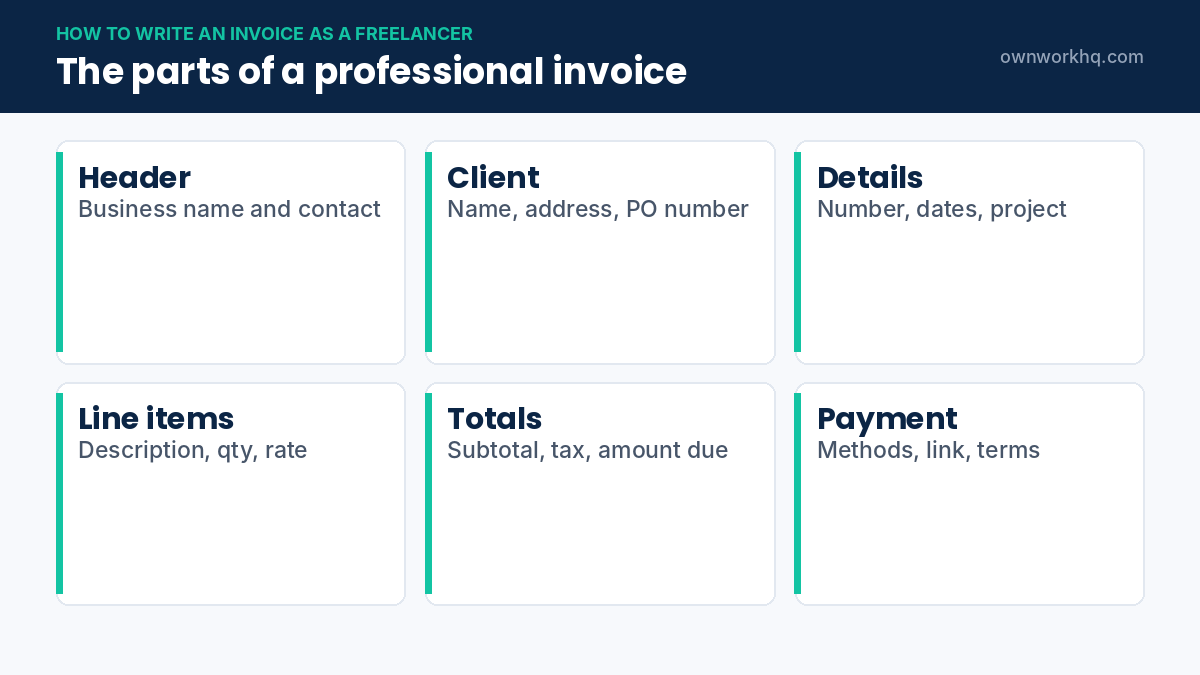
If you want a ready-made layout with all of these sections, start from our freelance invoice template and adjust it to your business.
Example invoice for a freelance project
| Description | Qty | Rate | Amount |
|---|---|---|---|
| Website copy: home page and 4 service pages | 5 pages | $250 | $1,250 |
| SEO keyword research | 1 | $300 | $300 |
| Additional revision round (outside scope) | 2 hours | $75 | $150 |
| Subtotal | $1,700 | ||
| Deposit received (May 3) | −$500 | ||
| Total due by June 14 | $1,200 |
Notice how each line describes the work clearly, extra work is billed separately and the deposit already paid is subtracted. That’s the clearest answer to how to write an invoice as a freelancer that gets paid without questions.
Choosing payment terms
| Terms | Meaning | When to use |
|---|---|---|
| Due on receipt | Pay immediately | Small jobs, new clients, deposits |
| Net 7 | Due within 7 days | Individuals and small businesses |
| Net 15 | Due within 15 days | A common default for freelancers |
| Net 30 | Due within 30 days | Larger companies with set payment cycles |
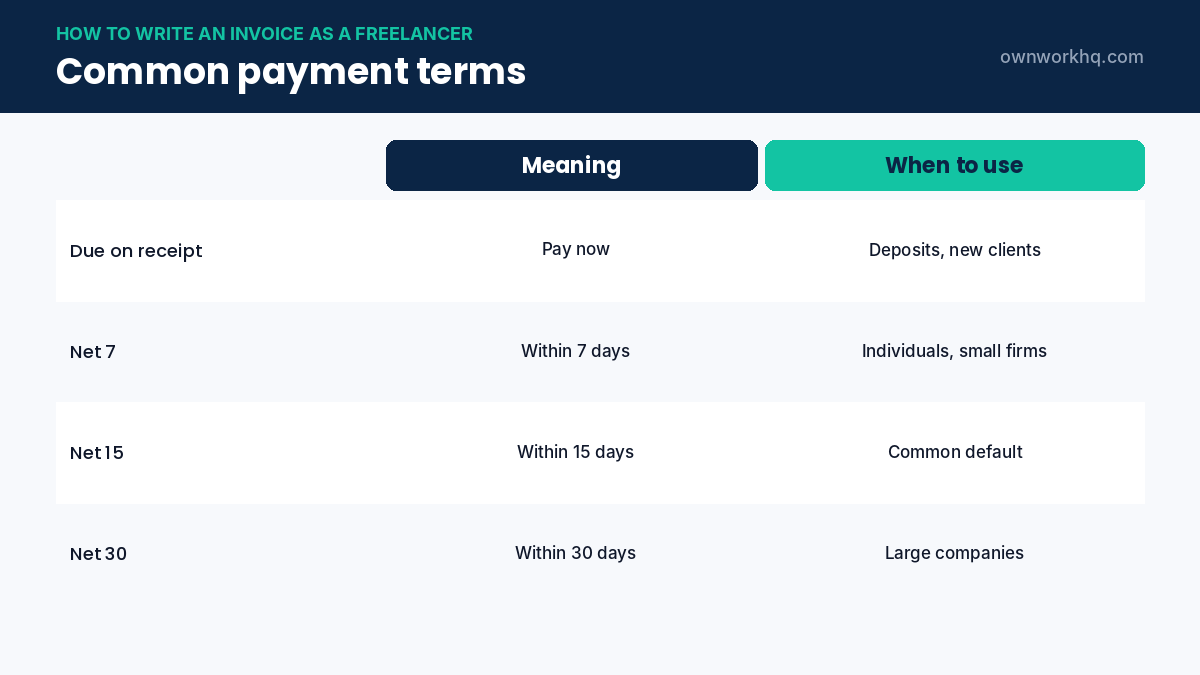
Agree on payment terms in your contract before work starts, then repeat them on every invoice. Shorter terms improve cash flow, but large companies may only pay on their own schedule, so plan for that when you quote. Our freelance contract template includes a payment terms clause.
Invoicing deposits, milestones and retainers
- Deposits: send a deposit invoice with the signed contract, often 25% to 50% of the project.
- Milestones: invoice each stage as it’s approved, and reference the milestone name on the invoice.
- Retainers: send a recurring invoice at the start of each month for the agreed amount.
- Final invoice: list the full project, subtract payments already received and show the balance due.
Each of these is still an invoice with its own number, so your records show every payment clearly.
Follow-up schedule for unpaid invoices
| When | What to send |
|---|---|
| 3 days before due date | A friendly reminder with the payment link |
| On the due date | A short note that the invoice is due today |
| 7 days late | A polite follow-up asking if anything is needed to process payment |
| 14 days late | A firmer reminder mentioning the late fee in your terms |
| 30 days late | A final notice; pause new work until the invoice is paid |
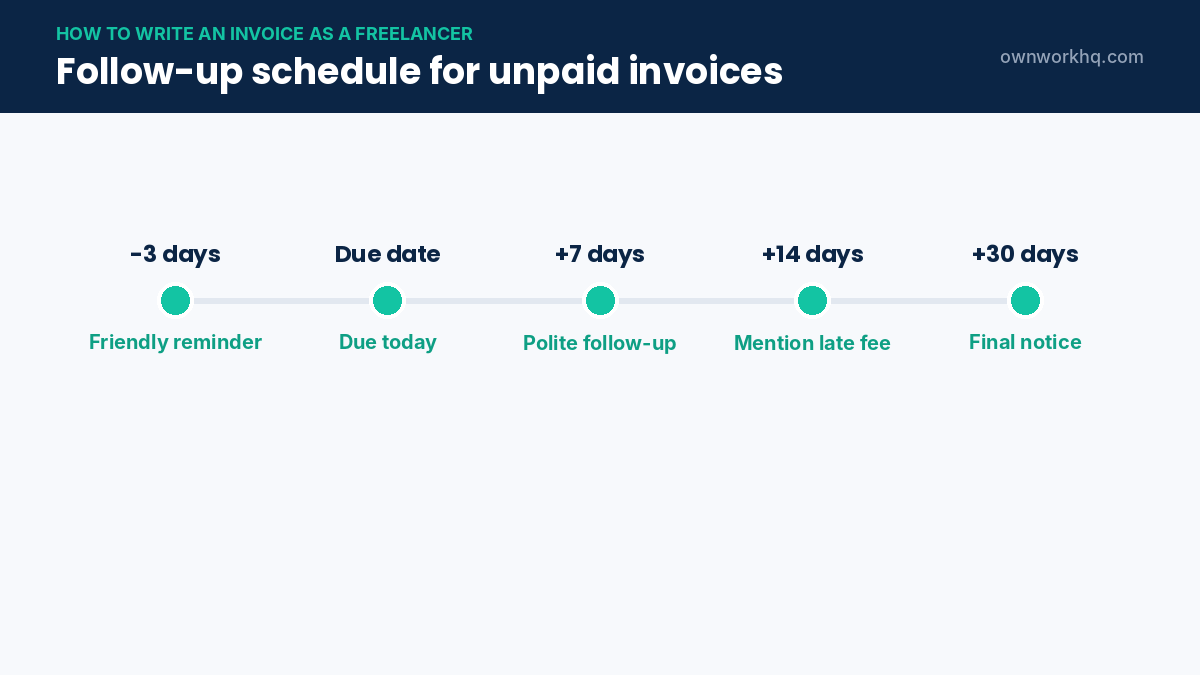
Most invoicing tools can send these reminders automatically. Keep every message polite and factual; most late payments are caused by internal approval delays, not bad intent.
Sales tax on freelance invoices
Most freelance services aren’t subject to sales tax, but the rules depend on your state and what you sell. Some states tax certain digital products, software or design work delivered in physical form. If you sell taxable items, show sales tax as a separate line and register with your state before collecting it. When in doubt, check your state revenue department’s website.
Invoicing international clients
- Agree on the currency in the contract and show it clearly on the invoice.
- Choose a low-fee payment method, since international wires and card payments can be expensive.
- Include any details the client needs, such as their tax or VAT number, if they ask for them.
- Record the US dollar amount you actually received for your tax records.
Record keeping after you send it
Keep a copy of every invoice you send and record the date each one is paid. Your invoice list is your income record for taxes, so it should match the deposits in your business bank account. Use the same numbering system all year and never reuse a number, even for a cancelled invoice. A clean record makes quarterly estimated taxes and year-end filing much faster.
Should you use software or a template?
A template in a document or spreadsheet works well when you send a few invoices a month. Once you have recurring clients, deposits and reminders to manage, invoicing software saves time with automatic numbering, online payments and reminders. Either way, the steps above are the same: clear details, itemized work, the amount due and how to pay.
Freelance invoice email template
How you send an invoice matters almost as much as the invoice itself. A short, clear email gets faster replies. Here’s a simple structure you can adapt:
- Subject: Invoice #1042 from [Your Business], due June 14
- Opening: Hi Sarah, thanks again for the project.
- Details: Attached is invoice #1042 for $1,200 for the website copy and SEO research, due June 14.
- Payment: You can pay by card or bank transfer using the link in the invoice.
- Close: Let me know if you need anything else to process it.
Keep the tone friendly and the details easy to find. Put the invoice number, amount and due date in both the subject and the body.
Invoice numbering that stays organized
| Format | Example | Good for |
|---|---|---|
| Sequential | 1001, 1002, 1003 | Simple and common |
| Year + number | 2026-014 | Resetting each year |
| Client code + number | ACME-007 | Many invoices per client |
Whichever format you choose, keep it consistent and never reuse a number. If you cancel an invoice, mark it as void instead of deleting it.
What to do when a client disputes an invoice
- Ask exactly which line or amount they question.
- Compare it with your contract, scope and approvals.
- If you made an error, send a corrected invoice with a new number or a credit note.
- If the charge is correct, explain it calmly and reference the agreement.
- Pause new work if a dispute drags on and the contract allows it.
Clear contracts and detailed line items prevent most disputes before they start. When you learn how to write an invoice as a freelancer with this level of detail, disputes become rare.
Freelance invoice checklist before you hit send
- Client name, billing contact and PO number are correct.
- Invoice number is new and the dates are right.
- Every freelance invoice line describes the work clearly.
- Deposits and previous payments are subtracted.
- Payment link or bank details work.
- Due date and terms match your contract.
Once you’ve sent a few invoices this way, the process becomes routine. Save your best version as a template, reuse your email wording, and keep your payment terms consistent across clients. Small details, like a clear due date and a working payment link, are what get freelance invoices paid on time.
Getting paid faster: small changes that work
- Invoice the same day the work or milestone is approved.
- Offer two payment options, such as card and bank transfer, so clients can use whichever is easiest.
- Ask for deposits on new clients and larger projects.
- Send to the right person: accounts payable, not just your project contact.
- Use shorter terms where the client accepts them, such as Net 15 instead of Net 30.
None of these require special tools, and together they can cut weeks off the time it takes to get paid.
Keep copies of all your invoices in one folder or app, and review unpaid invoices every week. A freelance invoice that’s followed up promptly is far more likely to be paid on time than one left waiting, and organized invoices make tax season much easier.
Frequently asked questions
How do I write my first invoice as a freelancer?
Include your details, the client’s details, a unique invoice number, invoice and due dates, itemized services, the total and payment instructions. Export it as a PDF and email it to the person who handles payments.
What invoice number should I start with?
Any number works as long as it’s unique and sequential. Many freelancers use the year plus a sequence, like 2027-001, which looks established and is easy to sort.
Can I charge a late fee on an invoice?
Only if the client agreed to it, ideally in your contract. Many freelancers use 1–1.5% per month on overdue balances, subject to state law.
Should I invoice before or after the work?
For new clients and larger projects, request a deposit upfront and invoice the balance on delivery. For ongoing work, invoice on a fixed schedule or at each milestone.
Do I need software to send invoices?
No. A template and a PDF work fine for a few invoices a month. Software helps with online payments, reminders and record-keeping as you grow.
Do freelancers need to include an EIN or Social Security number on invoices?
No. You don’t need to put either on an invoice. Clients who must issue a 1099 will ask for a Form W-9, and many freelancers get a free EIN so they don’t have to share their Social Security number.
Can I charge a late fee on a freelance invoice?
Usually yes, if it was agreed in your contract and complies with applicable law. State the fee in your terms and on each invoice, and apply it consistently.
How long should I wait before following up on an unpaid invoice?
Send a reminder on the due date and a follow-up about a week later. Automatic reminders make this consistent without awkward manual emails.
Should I send a freelance invoice as a PDF?
Yes, if you’re not using invoicing software with an online link. A PDF keeps formatting consistent and is hard to edit by mistake. Name the file with your business name and invoice number.
Disclaimer: This article is for informational purposes only and is not financial advice. Product features and prices change frequently, so confirm current details on each provider’s website before you sign up. OwnWork HQ may earn a commission from some links, at no extra cost to you.
About OwnWork HQ Editorial
We write plain-English guides for US freelancers and check every rate, limit and deadline against IRS and state agency publications. We are not CPAs or financial advisors; for advice on your situation, talk to a qualified professional.