Best Invoicing Software for Photographers (2026): HoneyBook vs Studio Ninja vs Dubsado
In short: The best invoicing software for photographers in 2026, comparing HoneyBook, Studio Ninja, Dubsado, FreshBooks, Wave and Pixieset on price, payment plans and contracts.


On this page
- Best invoicing software for photographers: comparison
- 1. HoneyBook: best all-in-one for photographers
- 2. Studio Ninja: best budget option built for photographers
- 3. Dubsado: best for automation
- 4. FreshBooks: best if you also want accounting
- 5. Wave: best free invoicing
- 6. Pixieset: convenient if you already use it for galleries
- Features photographers should look for
- Payment terms that protect photographers
- Example: a wedding payment plan
- Automations that save photographers the most time
- Sales tax on prints and products
- Contracts and invoices together
- Moving from spreadsheets to invoicing software
- How to choose: a quick decision guide
- Invoicing commercial clients: usage fees and expenses
- Payment plan settings that reduce chasing
- Keeping your books ready for tax time
- Deposits, retainers and taxes
- Mini sessions and high-volume bookings
- Questions to ask during a free trial
- Handling refunds, reschedules and cancellations
- Second shooters and assistants
- Frequently asked questions
- Sources
Photographers don’t just send invoices. You send a quote, a contract, a deposit invoice to lock the date, a payment plan for the balance, reminders before the shoot, and maybe an invoice for extra prints afterward. The best invoicing software for photographers handles that whole booking flow, not just the bill.
Quick pick: HoneyBook is the best all-in-one choice for most wedding and portrait photographers. Studio Ninja is the most affordable photography-specific option, Dubsado is best for heavy automation, and Wave is a solid free option if you only need simple invoices.
How we chose: we compared features and prices published on each provider’s official pricing page (checked October 2026). We haven’t been paid to include any product. Prices and promotions change often, so confirm on each site.
Best invoicing software for photographers: comparison
| Software | Best for | Starting price* | Payment plans | Contracts | Free trial |
|---|---|---|---|---|---|
| HoneyBook | All-in-one client management | $29/mo (Starter, billed yearly) | ✅ | ✅ | 30 days |
| Studio Ninja | Photography-specific, budget | $16/mo or $160/year (Starter, 5 active jobs) | ✅ | ✅ | 7 days |
| Dubsado | Advanced workflows and automation | $335/year (Starter); $525/year (Premier) | ✅ | ✅ | 21 days (Premier) |
| FreshBooks | Invoicing + accounting | $23/mo (Lite, 5 clients) | Deposits / retainers | Proposals with e-signature (Plus) | Yes |
| Wave | Free simple invoicing | $0 (Starter); $19/mo (Pro) | ❌ | ❌ | Free plan |
| Pixieset | If you already deliver galleries there | Free plan; paid plans reported from ~$10/mo | Check plan | Check plan | Free plan |
*Regular prices from official pricing pages, October 2026, except Pixieset (third-party pricing tracker CostBench, June 2026). Payment processing fees are extra.
1. HoneyBook: best all-in-one for photographers
HoneyBook combines proposals, contracts, invoices and payments in one flow. A client can pick a package, sign the contract and pay the deposit in a single step. All plans include unlimited clients and projects. The Starter plan ($29/month billed yearly) covers invoices, payments, proposals, contracts and a calendar, while Essentials ($49/month billed yearly) adds a scheduler, automations, QuickBooks integration and SMS reminders.
- Card fees: starting at 2.7% + 10¢; ACH 1.5% (per HoneyBook’s pricing page).
- Pros: polished client experience, payment schedules, strong templates.
- Cons: automations require Essentials; pricier than photography-specific tools.
2. Studio Ninja: best budget option built for photographers
Studio Ninja is designed specifically for photographers, with job management, booking forms, contracts, invoices and payment schedules. The Starter plan costs $16/month or $160/year but is limited to 5 active jobs, so most working photographers will want Professional ($27/month or $270/year) with unlimited jobs and up to 3 users.
- Pros: photography-focused workflows, good value on annual billing, free migration from other platforms.
- Cons: shorter 7-day trial; the Starter job limit is tight in wedding season.
3. Dubsado: best for automation
Dubsado is loved by photographers who want to automate everything from inquiry to gallery delivery. Both plans include invoicing with payment plans, contracts, client portals and unlimited clients. The Premier plan ($525/year) adds scheduling, automated workflows, public proposals and bookkeeping integrations, and the 21-day free trial gives you full Premier access.
- Pros: very flexible workflows; annual pricing works out to about $28–$44/month.
- Cons: steeper learning curve; scheduling and workflows aren’t in Starter.
4. FreshBooks: best if you also want accounting
FreshBooks isn’t photography-specific, but it’s a strong choice if you want invoices, expenses, mileage and tax reports in one place. Lite ($23/month) is limited to 5 billable clients, so busy photographers will usually need Plus ($43/month), which adds proposals with e-signatures and retainers. We compare it in more depth in our guide to the best invoicing software for consultants.
5. Wave: best free invoicing
If you shoot occasionally and just need clean invoices, Wave’s free Starter plan offers unlimited invoices and estimates with online payments at 2.9% + $0.60 per card transaction. It doesn’t have contracts or payment schedules, so it’s better for product or headshot photographers than wedding photographers.
6. Pixieset: convenient if you already use it for galleries
Many photographers already deliver client galleries through Pixieset, which also offers studio management tools. Using one platform for galleries, invoicing and contracts reduces app-switching. Third-party tracker CostBench reports a forever-free plan and paid plans from about $10/month, but check Pixieset’s site for current features and prices.
Features photographers should look for
- Deposits and payment schedules: for example, a 30% retainer at booking and the balance 14 days before the wedding.
- Contracts with e-signature linked to the invoice, so the date is only held when both are complete.
- Packages and add-ons, so clients can choose collections, extra hours or albums.
- Automatic payment reminders to stop you from chasing balances.
- Card and ACH payments. ACH is usually cheaper for large wedding balances.
- Questionnaires and scheduling to collect shot lists and book sessions.
- Accounting integration (QuickBooks or Xero) for tax time.
| If you… | Choose |
|---|---|
| Shoot weddings and want a polished client experience | HoneyBook |
| Want photography-specific tools on a budget | Studio Ninja |
| Love building automated workflows | Dubsado |
| Want invoicing + bookkeeping | FreshBooks |
| Just need free invoices | Wave |
Payment terms that protect photographers
- Require a non-refundable retainer to book a date, stated clearly in your contract.
- Set a balance due date before the event, not after delivery.
- Define late-payment and cancellation terms in writing.
- Withhold final gallery delivery until the balance is paid, if your contract allows.
- Keep proof of approvals for packages, add-ons and changes.
Your contract protects your income, and insurance protects you from accidents at the venue. If you haven’t sorted that out yet, read our guide to general liability insurance for photographers.
Example: a wedding payment plan
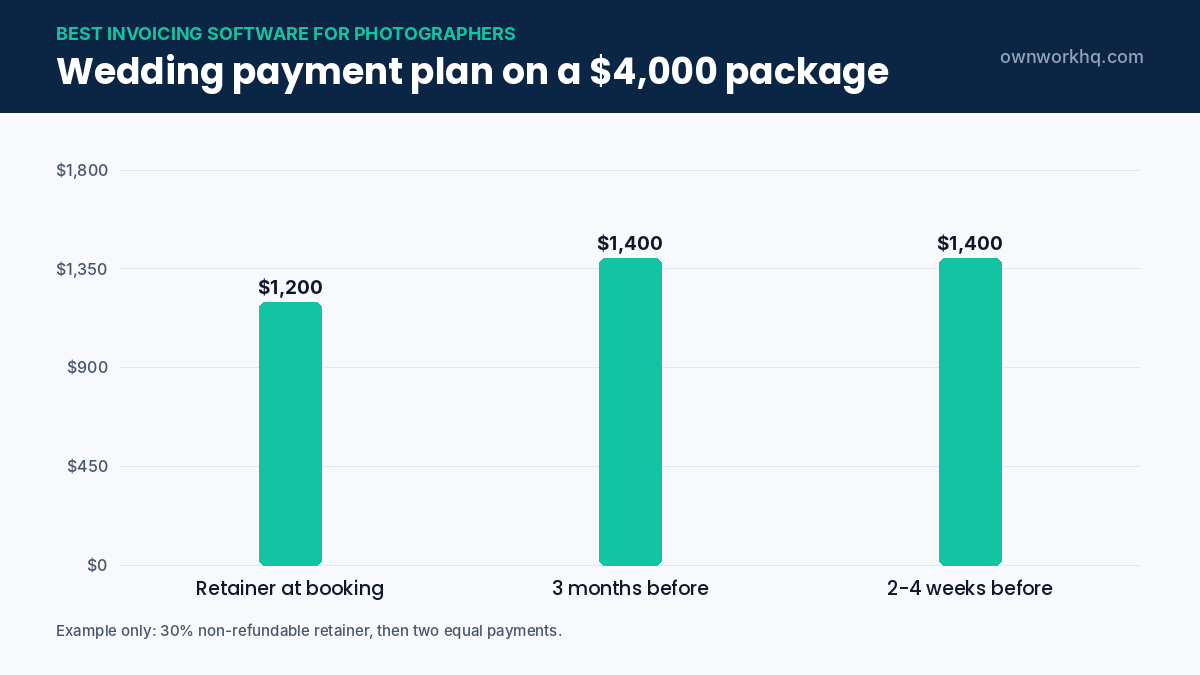
| Payment | When | Example on a $4,000 package |
|---|---|---|
| Retainer (non-refundable) | At booking, with the signed contract | $1,200 (30%) |
| Second payment | About 3 months before the wedding | $1,400 (35%) |
| Final balance | 2–4 weeks before the wedding | $1,400 (35%) |
Most photography-focused tools let you build this as a template, so every booking gets the same schedule and automatic reminders. Collecting the balance before the event avoids chasing payments after you’ve delivered the gallery.
Automations that save photographers the most time
- Inquiry auto-reply with your pricing guide and availability link.
- Booking sequence: proposal, contract, retainer invoice in one step.
- Questionnaire sent a month before the shoot.
- Payment reminders before each installment is due.
- Gallery delivery email with a link to order prints or albums.
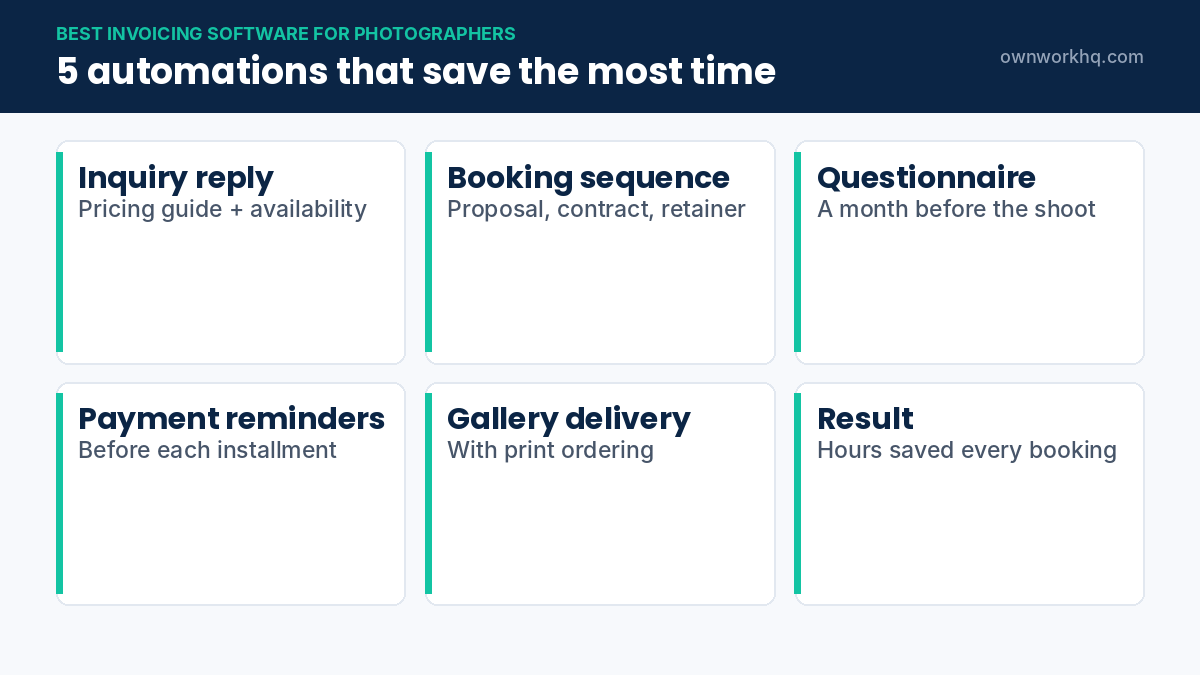
Setting these up takes a few hours once and saves time on every client after that. It’s the biggest reason the best invoicing software for photographers is often an all-in-one studio tool rather than a plain invoicing app.
Sales tax on prints and products
Photography services are taxed differently from state to state, and physical prints, albums and products are often taxable. If you sell prints or albums, check your state’s rules, register for a sales tax permit if needed, and turn on sales tax for those items in your invoicing software. Digital-only delivery may be treated differently, so confirm with your state revenue department.
Contracts and invoices together
- Retainer terms: state that the retainer secures the date and is non-refundable.
- Cancellation and rescheduling: what’s owed if the date moves or the event is cancelled.
- Delivery timeline: when the gallery is delivered and in what format.
- Usage rights: personal-use license for clients, portfolio rights for you.
- Late payment: what happens if the final balance isn’t paid before the event.
Most photography tools include e-signatures, so the contract and first invoice go out together. Adapt our freelance contract template if your tool doesn’t include photography templates.
Moving from spreadsheets to invoicing software
- Choose a quiet month to switch, outside peak wedding season.
- Recreate your packages and payment plans as templates.
- Import current clients and enter outstanding balances.
- Send upcoming payment reminders from the new system.
- Keep your old records for at least seven years for taxes.
Pair your invoicing with proper insurance for the shoot itself; see general liability insurance for photographers.
How to choose: a quick decision guide
| If you mostly shoot… | Look for | Good fit from this guide |
|---|---|---|
| Weddings and elopements | Payment plans, contracts, questionnaires, workflows | HoneyBook, Dubsado, Studio Ninja |
| Portraits and mini sessions | Booking calendar, deposits, quick invoices | Studio Ninja, HoneyBook, Pixieset |
| Commercial and editorial | Line-item invoices, usage fees, expenses, accounting | FreshBooks, Wave |
| A mix, with low volume | Free or low-cost plan, simple invoices | Wave, Pixieset |
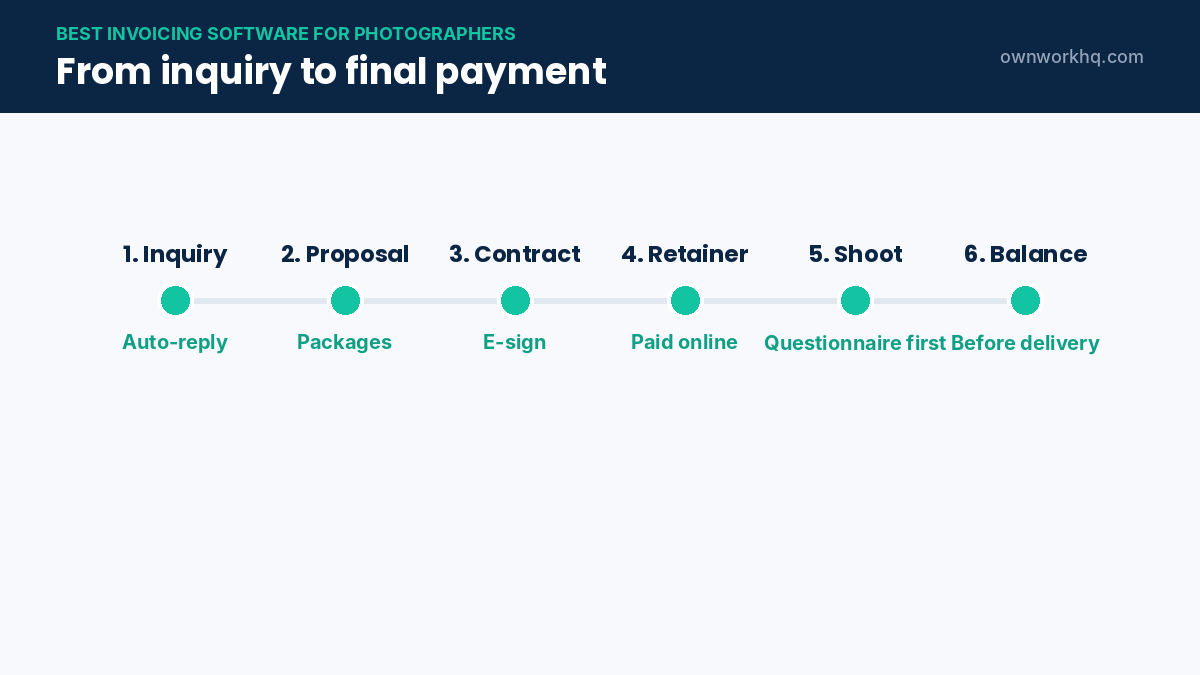
The best invoicing software for photographers is the one that matches how clients book you. If most of your income comes from a few large weddings, payment plan features and contracts matter most. If you invoice agencies for commercial shoots, line items, usage fees and expense tracking matter more.
Invoicing commercial clients: usage fees and expenses
Commercial photography invoices often include more than a session fee. Common line items include:
- Creative fee for the shoot day or half day.
- Usage or licensing fee based on where and how long the images will be used.
- Post-production charged per image or per hour.
- Expenses such as assistants, rentals, travel, props and location fees.
Invoicing software that supports expense capture lets you attach receipts and add them to the client’s invoice, with a markup if your contract allows it. Commercial clients may also need a W-9 and a purchase order number before they can pay you.
Payment plan settings that reduce chasing
- Turn on automatic reminders a few days before each installment is due and again if it’s late.
- Offer autopay so clients can save a card and pay each installment automatically.
- Show the full schedule on every invoice so clients always know what’s next.
- Set the final due date before the event, not after delivery.
- Accept ACH for large balances to keep processing fees lower.
Once these settings are part of your template, every new booking gets the same payment plan without extra work. That consistency is a big part of what makes invoicing software worth paying for.
Keeping your books ready for tax time
Your invoicing software records income, but you also need to track expenses such as gear, editing software, travel and insurance. If the tool you choose doesn’t include bookkeeping, connect it to accounting software or export reports monthly. Reviewing income each quarter also makes quarterly estimated taxes far easier, especially during a busy wedding season when deposits arrive months before the work.
Deposits, retainers and taxes
A retainer paid in March for a September wedding is generally income when you receive it if you use the cash method, which most freelance photographers do. Set aside part of every retainer for taxes as it arrives. Your invoicing software reports by payment date make this simple to track.
Mini sessions and high-volume bookings
Mini sessions and school or event photography bring many small payments in a short time. For this kind of work, choose invoicing software with a booking page that collects full payment at checkout, instead of sending individual invoices. Clients pick a time slot, pay, and receive a confirmation automatically. Afterwards, one report shows every payment for the event, which makes reconciliation and taxes much easier.
Questions to ask during a free trial
- Can I build a package with a deposit and a payment plan in under ten minutes?
- Does the client portal look professional on a phone?
- Can clients pay by card and bank transfer, and what are the fees?
- Does it send reminders automatically, and can I edit the wording?
- Can I export clients, invoices and payments if I leave?
- Does it connect to my calendar, gallery platform and accounting software?
Send a test booking to yourself from start to finish. How it feels as a client is the best test of whether real clients will pay on time.
Handling refunds, reschedules and cancellations
Even with a clear contract, plans change. Good software lets you move a booking to a new date while keeping payments already received, issue partial refunds, and keep a record of every change. Note what was agreed in writing, update the payment schedule, and send the client a revised invoice so both sides have the same numbers.
Second shooters and assistants
If you hire second shooters or assistants as independent contractors, track what you pay them in the same system or in your accounting software. You’ll need their W-9 before the first payment, and you may need to issue a 1099-NEC if payments to one person reach the reporting threshold for the year. Keeping these payments organized alongside client income gives you a clear picture of profit for every wedding or event.
Frequently asked questions
What is the best invoicing software for wedding photographers?
HoneyBook is the most popular all-in-one option for wedding photographers, combining proposals, contracts, payment plans and invoices. Studio Ninja and Dubsado are strong alternatives, with Studio Ninja being more affordable and Dubsado more customizable.
Is there free invoicing software for photographers?
Yes. Wave offers free unlimited invoices, and Pixieset has a free plan. Free tools usually lack contracts and payment schedules, which most wedding and event photographers need.
HoneyBook vs. Dubsado: which is better for photographers?
HoneyBook is easier to set up and has a smoother client experience, while Dubsado offers more powerful custom workflows at a lower annual price. Both include contracts and payment plans.
Should photographers charge a deposit?
Most professional photographers charge a non-refundable retainer to reserve a date, often between 25% and 50% of the package price, with the balance due before the event. Put the terms in your contract.
Can I deduct photography business software?
Software subscriptions used for your business are generally deductible business expenses for self-employed photographers. Confirm with a tax professional.
Can photographers accept payment plans online?
Yes. HoneyBook, Studio Ninja, Dubsado and similar tools let you split a package into scheduled payments with automatic reminders and online card or ACH payment.
Do I need photography-specific invoicing software?
Not necessarily. If you shoot a few commercial jobs a month, general tools like FreshBooks or Wave work well. Wedding and portrait photographers with many bookings usually benefit from a studio tool with contracts and questionnaires built in.
What should a photography invoice include?
Your business details, the client’s details, the session or package, date of the event, payment schedule, amounts paid and due, and accepted payment methods. Add any print or product sales as separate line items.
Should a photographer’s retainer be refundable?
Many photographers make the retainer non-refundable because it reserves a date they can’t sell to anyone else. Whatever you choose, state it clearly in the contract and on the first invoice.
What is the cheapest invoicing software for photographers?
Wave offers free invoicing, and some gallery platforms include basic invoicing in their plans. Paid studio tools cost more but add contracts, payment plans and automations that save time as bookings grow.
Sources
- HoneyBook pricing
- Studio Ninja pricing
- Dubsado pricing
- FreshBooks pricing
- Wave pricing
- CostBench: Pixieset free plan (June 2026)
Disclaimer: This article is for informational purposes only and is not financial advice. Product features and prices change frequently, so confirm current details on each provider’s website before you sign up. OwnWork HQ may earn a commission from some links, at no extra cost to you.
About OwnWork HQ Editorial
We write plain-English guides for US freelancers and check every rate, limit and deadline against IRS and state agency publications. We are not CPAs or financial advisors; for advice on your situation, talk to a qualified professional.