Business Insurance for Virtual Assistants: What You Need & Cost (2026)
In short: Which business insurance virtual assistants need in 2026 (professional liability, cyber, general liability), what it costs, and how to reduce risk when you access client accounts.


On this page
- How much does insurance cost for a virtual assistant?
- Business insurance for virtual assistants: the policies you need
- Real risks VAs should plan for
- Security practices that reduce risk (and help with insurance)
- Contract terms every VA should include
- How to buy business insurance as a virtual assistant
- Risk by type of VA service
- Fidelity bonds, explained
- Onboarding client access safely
- Working through agencies and VA platforms
- Business insurance for virtual assistants: buying checklist
- Real scenarios virtual assistants face
- What it costs per year
- Contract terms to pair with your insurance
- Security habits that keep premiums and risk low
- Questions clients ask about your insurance
- Insurance as you grow into an agency
- Keeping records that support a claim
- Frequently asked questions
- Sources
Virtual assistants often have more access to a client’s business than anyone outside the company: inboxes, calendars, CRMs, social media accounts, invoicing tools and sometimes bank or payment dashboards. That access is what makes a VA valuable, and it’s also what creates risk. Business insurance for virtual assistants is mostly about protecting you if a mistake, missed task or data incident costs a client money.
Key takeaways
- Professional liability covers costly mistakes: a missed deadline, a wrong invoice, a botched email campaign. It’s the core policy for VAs.
- Cyber insurance matters because VAs often have access to client accounts and customer data.
- General liability is inexpensive and often required by contracts, but it doesn’t cover work mistakes.
- A fidelity bond can reassure clients when you handle their money or financial accounts.
- Median costs for home-based businesses: $42 general liability, $49 professional liability, $58 BOP, $64 cyber per month.
How much does insurance cost for a virtual assistant?
Insureon doesn’t publish a separate figure for virtual assistants, but its data for home-based businesses, the category most VAs fall into, is a useful benchmark (data updated July 2026):
| Policy | Median monthly | Typical annual range | Common limits | Priority for VAs |
|---|---|---|---|---|
| Professional liability (E&O) | $49 | ~$270–$2,600 | $1M / $1M | Essential |
| Cyber insurance | $64 | ~$250–$2,600 | Varies | High if you access client data |
| General liability | $42 | ~$250–$1,750 | $1M / $2M | Medium (often required by contracts) |
| Business Owner’s Policy (BOP) | $58 | ~$300–$2,900 | Varies | Useful for equipment and home office |
| Workers’ compensation | $48 | ~$220–$3,000 | Set by state | Required in most states if you hire |
Solo VAs offering admin and scheduling support often pay at the low end. VAs who manage bookkeeping, payments, e-commerce stores or large email lists usually pay more, because a mistake in those areas can be expensive.
Business insurance for virtual assistants: the policies you need
Professional liability (errors and omissions)
This is the policy that responds when a client says your work caused a financial loss. Typical VA scenarios include:
- You schedule a webinar for the wrong time zone and the client loses paid registrations.
- You send an invoice with the wrong amount or to the wrong client.
- An email campaign goes to the wrong list, causing unsubscribes or a compliance complaint.
- You miss a filing or renewal deadline that you were responsible for tracking.
Cyber insurance
If you log into client systems, store passwords, or download customer lists, a stolen laptop or phished account could expose that data. Cyber insurance can help pay for breach investigations, customer notifications and claims from affected clients.
General liability
General liability covers bodily injury, property damage and advertising injury. Fully remote VAs rarely face these claims, but many client contracts and agencies still require proof of general liability. It’s usually the cheapest policy to add. For a deeper look at this difference, see our guide to general liability insurance for consultants.
Fidelity bond
A fidelity bond, also called a business service bond, can reimburse a client if an employee or contractor steals money or property. Some VAs who manage finances get bonded as a selling point, even though it’s rarely legally required.
Real risks VAs should plan for
| Risk | Example | Coverage that helps |
|---|---|---|
| Work error | Wrong payment amount sent to a vendor | Professional liability |
| Missed deadline | Grant application submitted late | Professional liability (check exclusions) |
| Data breach | Phishing email gives a hacker access to a client’s inbox | Cyber insurance |
| Lost equipment | Laptop with client files stolen from a café | BOP / equipment coverage + cyber |
| Contract requirement | Agency won’t onboard you without a COI | General liability (and often E&O) |
Security practices that reduce risk (and help with insurance)
Insurers often ask about your security habits, and good practices make claims less likely:
- Use a password manager with shared vaults instead of sending passwords by email.
- Turn on two-factor authentication for every client account you access.
- Request user-level access (delegated accounts) instead of using the owner’s credentials.
- Encrypt your devices and use automatic screen locks.
- Avoid public Wi-Fi for client work, or use a reputable VPN.
- Keep a written process for payments, such as double-checking amounts and recipients before sending.
Contract terms every VA should include
- Scope of services, with tasks you do and don’t handle (for example, “I don’t approve payments”).
- Client responsibilities for final approvals on payments, campaigns and legal filings.
- Limitation of liability, capping your exposure at fees paid.
- Confidentiality and data handling terms, including how access is granted and removed.
- Termination and offboarding, covering how credentials are returned and access removed.
How to buy business insurance as a virtual assistant
- List your services and the systems you access (email, finance, CRM, e-commerce).
- Check client and agency requirements for policy types and limits.
- Get quotes for professional liability first, then add cyber and general liability.
- Ask about bundles such as professional + general liability, or a BOP.
- Compare exclusions, especially for missed deadlines, financial transactions and data incidents.
- Save your certificate of insurance and update it when you add services.
Want to see how VA costs compare with other freelance careers? Check our breakdown of how much business insurance costs for freelancers.
Risk by type of VA service
| Service | Typical risk | Policy to prioritize |
|---|---|---|
| Inbox and calendar management | Missed meetings, wrong emails sent | Professional liability |
| Bookkeeping and invoicing | Billing errors, missed payments | Professional liability; consider a fidelity bond |
| Social media management | Posting errors, copyright or defamation | Professional liability with media coverage |
| Customer support | Mishandled customer data | Cyber insurance |
| E-commerce and order management | Fulfillment errors, payment data exposure | Professional liability and cyber |
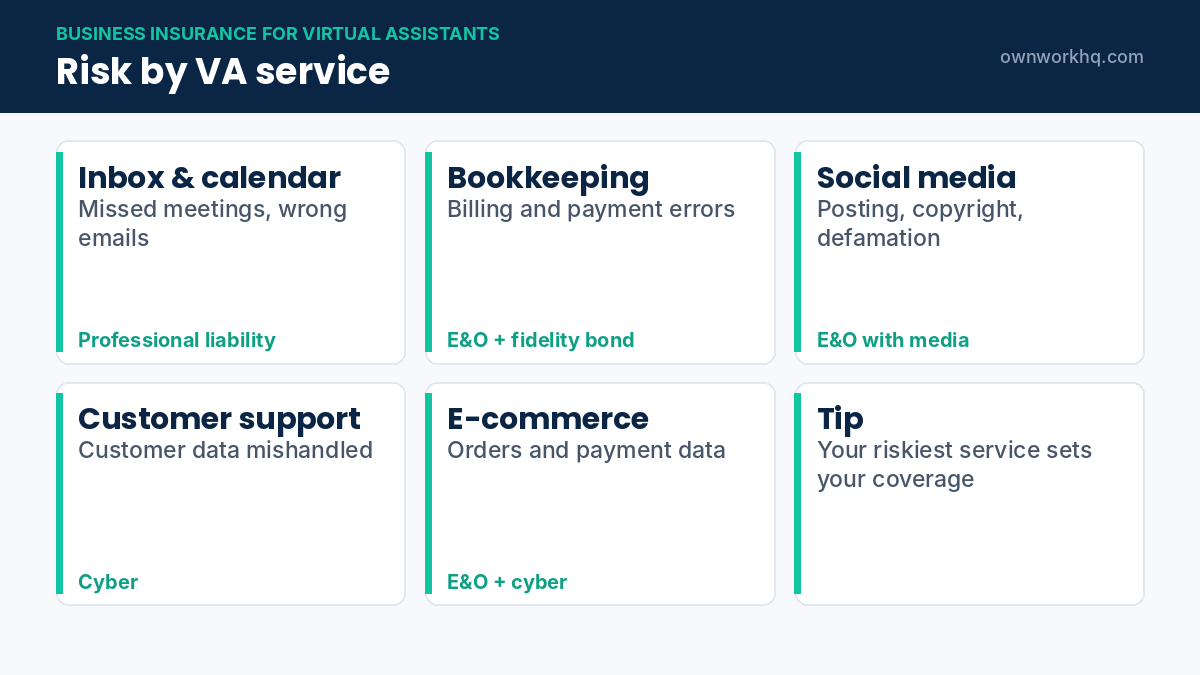
If you offer several services, the highest-risk one should drive your coverage choices. Business insurance for virtual assistants that handle money or customer data needs more than a basic policy.
Fidelity bonds, explained
A fidelity bond protects your client if someone in your business is dishonest, for example by stealing funds. It’s different from insurance for your own mistakes:
| Protects against | Who benefits | |
|---|---|---|
| Professional liability | Your errors, omissions and negligence | You (pays claims against you) |
| Cyber insurance | Data breaches and cyber incidents | You and, through liability coverage, affected clients |
| Fidelity bond | Theft or dishonesty | Your client |
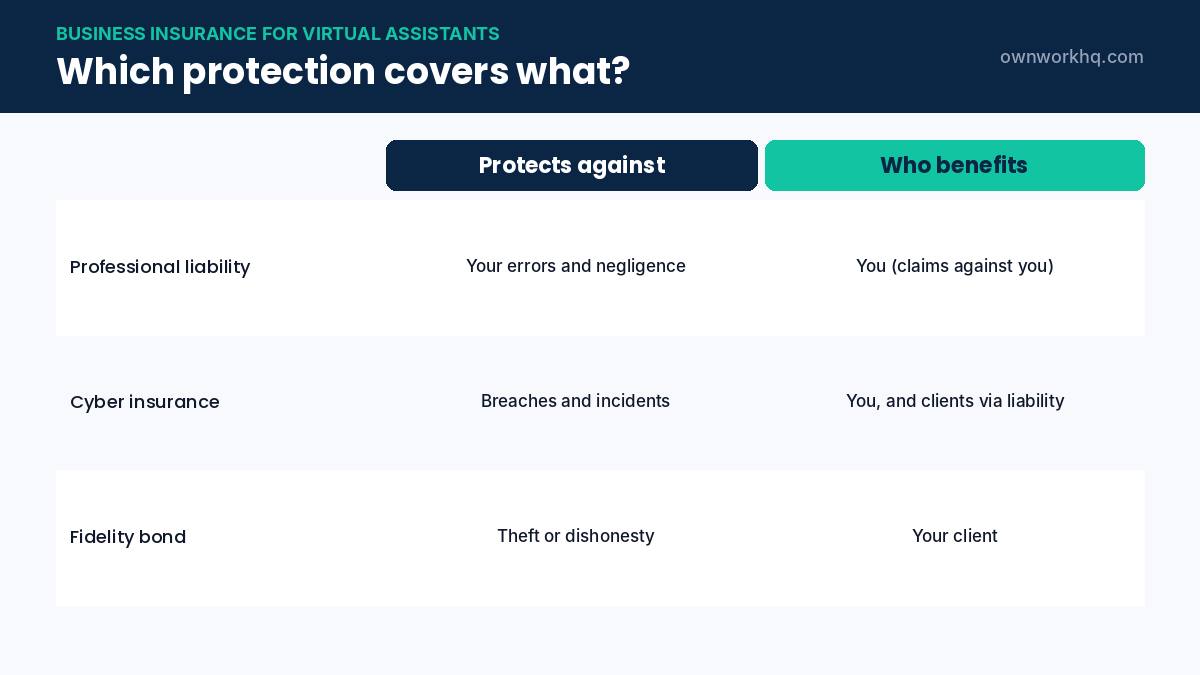
Clients who give you access to bank accounts or payment tools sometimes ask for a bond. It’s usually inexpensive and can be a selling point for bookkeeping-focused VAs.
Onboarding client access safely
- Use a password manager with shared vaults instead of receiving passwords by email or chat.
- Ask for your own user account with the lowest access level needed, rather than the owner’s login.
- Turn on two-factor authentication for every account you use.
- Document what you can access in a simple access log for each client.
- Offboard properly: ask the client to remove your access when the work ends, and confirm it in writing.
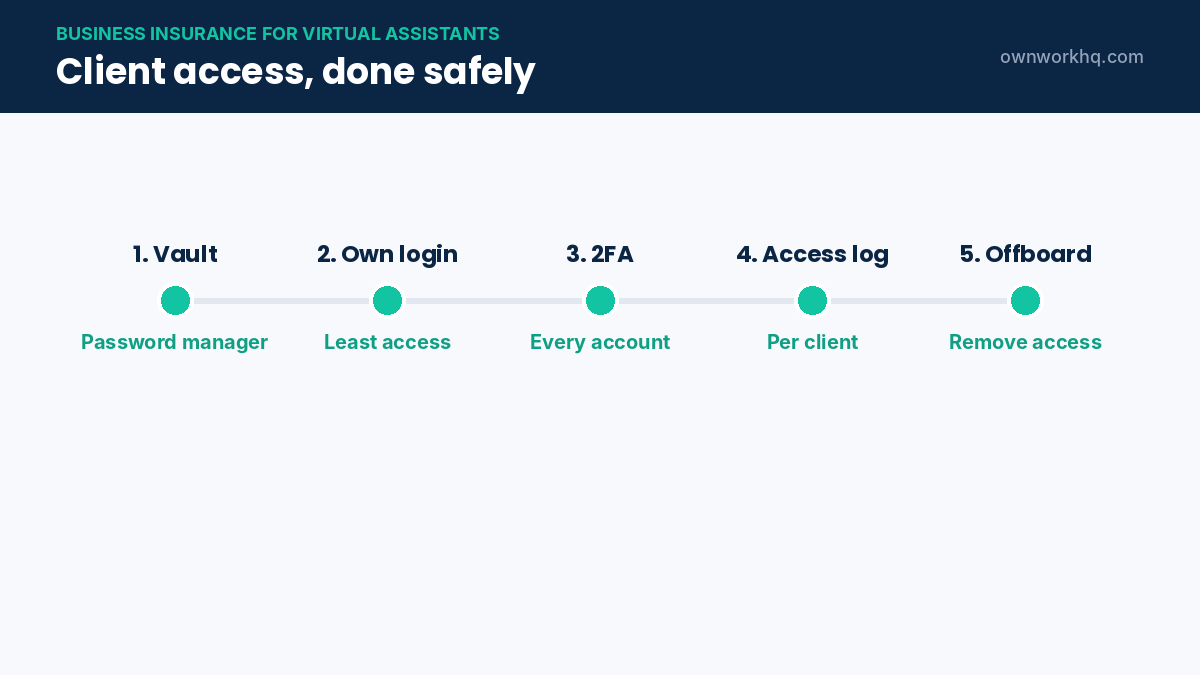
These steps reduce the chance of a costly incident, and insurers often ask about them on cyber applications.
Working through agencies and VA platforms
If you work through a VA agency, check whether you’re covered by its insurance or must carry your own. Many agencies require contractors to have professional liability. Platforms that connect VAs with clients generally don’t insure the VA’s work. When in doubt, ask for the insurance requirements in writing.
Business insurance for virtual assistants: buying checklist
- List your services and the client systems you access.
- Check client contracts and agency agreements for insurance requirements.
- Start with professional liability at limits that match those requirements.
- Add cyber insurance if you handle logins, customer data or payments.
- Consider a fidelity bond if you manage client money.
- Compare quotes, buy, and save certificates for client onboarding.
Real scenarios virtual assistants face
| What happened | Possible claim | Coverage |
|---|---|---|
| You scheduled a client’s webinar for the wrong time zone | Lost registrations and ad spend | Professional liability |
| An invoice you sent had the wrong amount and went unpaid for months | Cash-flow losses | Professional liability |
| A phishing email gave attackers access to the client’s inbox | Breach response and liability | Cyber insurance |
| A social post you scheduled made a false claim about a competitor | Defamation | Professional liability with media coverage |
Most of these start with a small mistake. Clear processes and written instructions prevent many of them; business insurance for virtual assistants covers the ones that slip through.
What it costs per year
| Coverage setup | Approximate yearly cost |
|---|---|
| Professional liability only | About $590 (at a $49/month median) |
| Professional liability + general liability | About $1,090 |
| Professional liability + cyber | About $1,360 |
| Professional liability + cyber + general liability | About $1,860 |
Based on the median costs for home-based businesses earlier in this guide. Many VAs with few clients and limited data access pay less.
Contract terms to pair with your insurance
- Scope of authority: list what you may send, approve or pay on the client’s behalf.
- Approval rules: require written approval for payments, public posts and anything sent to customers.
- Liability cap: limit your liability to fees paid in a recent period, such as three months.
- Data handling: state how you store, use and delete client data.
- Termination and access removal: commit both sides to revoking access when the contract ends.
A written agreement makes expectations clear and helps your insurer defend you. Start with our freelance contract template.
Security habits that keep premiums and risk low
- Use a password manager and never reuse passwords across clients.
- Enable two-factor authentication on every client and personal account.
- Keep work on an encrypted, updated computer with a screen lock.
- Verify payment or account-change requests by phone or a second channel.
- Don’t download client data to personal devices unless necessary, and delete it when done.
Cyber insurers increasingly ask about these controls. Strong answers can make coverage easier to get, and they prevent the incidents that lead to claims in the first place.
Questions clients ask about your insurance
- “Do you carry professional liability?” Have your certificate ready to send.
- “What are your limits?” Most small clients are satisfied with $1 million.
- “Can you add us as an additional insured?” Possible on general liability, usually by endorsement.
- “Are you bonded?” Relevant if you handle their money; a fidelity bond answers it.
Being able to answer these quickly signals professionalism and can help you win higher-paying, longer-term clients.
Insurance as you grow into an agency
Many virtual assistants eventually hire other VAs. When that happens, coverage needs change: you may need workers’ compensation for employees, policies that cover subcontractors, higher limits for bigger clients and stronger cyber protection because more people have access to client systems. Review business insurance for virtual assistants every time you add team members or new services, not just at renewal.
Keeping records that support a claim
If a client ever disputes your work, records are your strongest defense. Save written instructions, approvals and task confirmations in one place for each client, keep your access log current, and archive email threads about anything financial. Most project tools and inboxes let you export these easily, and they can turn a long dispute into a short one.
Frequently asked questions
Do virtual assistants need insurance?
It isn’t legally required for a solo VA without employees, but professional liability is strongly recommended because VAs handle tasks where mistakes can cost clients money. Many agencies and larger clients require proof of coverage.
How much is insurance for a virtual assistant?
Insureon’s data for home-based businesses shows median costs of about $49/month for professional liability, $42/month for general liability and $64/month for cyber insurance. Your price depends on your services, revenue and limits.
Does professional liability cover data breaches?
Usually not fully. Data breaches are typically handled by cyber insurance. Some professional liability policies include limited cyber coverage, so check the policy.
What is a fidelity bond and do I need one?
A fidelity bond can reimburse a client for theft by you or your staff. It’s rarely required for VAs, but it can be a trust signal if you manage client finances.
Are VA insurance premiums tax deductible?
Business insurance premiums are generally deductible for self-employed VAs. Confirm with a tax professional.
Is business insurance for virtual assistants tax deductible?
Generally yes. Premiums for professional liability, cyber and general liability are deductible business expenses for self-employed VAs.
Do I need insurance if I work for international clients?
Coverage territory varies. Some policies cover claims brought anywhere, others only in the US. If many of your clients are abroad, ask the insurer before buying.
Can I use my client’s insurance instead of my own?
Usually not. A client’s policy protects the client’s business, not you as an independent contractor. Many contracts also require you to carry your own coverage.
Do virtual assistants need general liability insurance?
Only some do. If you work entirely online, injury and property claims are unlikely, but clients or agencies may still require general liability in their contracts. It’s usually inexpensive to add.
Does professional liability cover me if I miss a deadline?
Often yes, if the missed deadline causes the client a financial loss and the policy covers professional errors and omissions. Pure contract disputes, such as refusing to deliver work, may be excluded.
How much should a new virtual assistant budget for insurance?
Many new VAs start with professional liability alone, around $50 a month at the median for home-based businesses, and add cyber or general liability as their services and client requirements grow.
Can I get business insurance for virtual assistants outside the US?
Policies sold by US insurers generally require a US-based business. If you live abroad, look for insurers in your country, and check whether they can cover claims from US clients.
How long does it take to get insured as a VA?
Most online insurers can quote and bind professional liability the same day, so you can send a certificate to a new client within hours.
Does professional liability cover data I accidentally delete?
If deleting the data causes the client a financial loss, a professional liability claim may be covered, subject to the policy terms. Restoring data after a cyberattack is usually a cyber insurance matter.
Do I need insurance for each client separately?
No. One policy covers your VA business across all clients. Clients who need proof can each receive a certificate of insurance.
Sources
- Insureon: Home-based business insurance costs (updated July 2026)
- Insureon: Virtual assistant insurance
Disclaimer: This article is for informational purposes only and is not insurance, legal or financial advice. OwnWork HQ is not a licensed insurance agent. Coverage, prices and eligibility vary by insurer and state and can change at any time, so always confirm details with the insurer or a licensed broker before you buy.
About OwnWork HQ Editorial
We write plain-English guides for US freelancers and check every rate, limit and deadline against IRS and state agency publications. We are not CPAs or financial advisors; for advice on your situation, talk to a qualified professional.